
Core web vitals for small businesses are no longer optional. Google’s 2025 ranking signals reward sites with fast loading (LCP under 2.5s), stable layouts (CLS under 0.1), and responsive interactions (INP under 200ms). Fix these three metrics and you can outrank larger competitors even on a tight budget.
What Are Core Web Vitals and Why Should Small Businesses Care?
If you run a small business website, core web vitals for small business SEO are among the most powerful levers you can pull right now. In 2025, Google continues to refine how it evaluates website quality, and one of the most influential ranking factors shaping modern SEO is Core Web Vitals.
These aren’t just technical buzzwords. These metrics measure website performance and user experience, focusing on loading speed, responsiveness, and visual stability. In plain terms, they measure how your site feels to a real visitor on a real device.
Here’s the most compelling reason for small businesses to pay attention: if two sites have equally relevant content, the one with better Core Web Vitals meaning faster and more stable can rank higher. That’s a genuine opportunity to level the playing field against bigger competitors.
Furthermore, the business impact is real. A 1-second delay can reduce conversions by up to 7%. For a small business, that’s money walking straight out the door.
The Three Google Ranking Signals That Matter Most in 2025
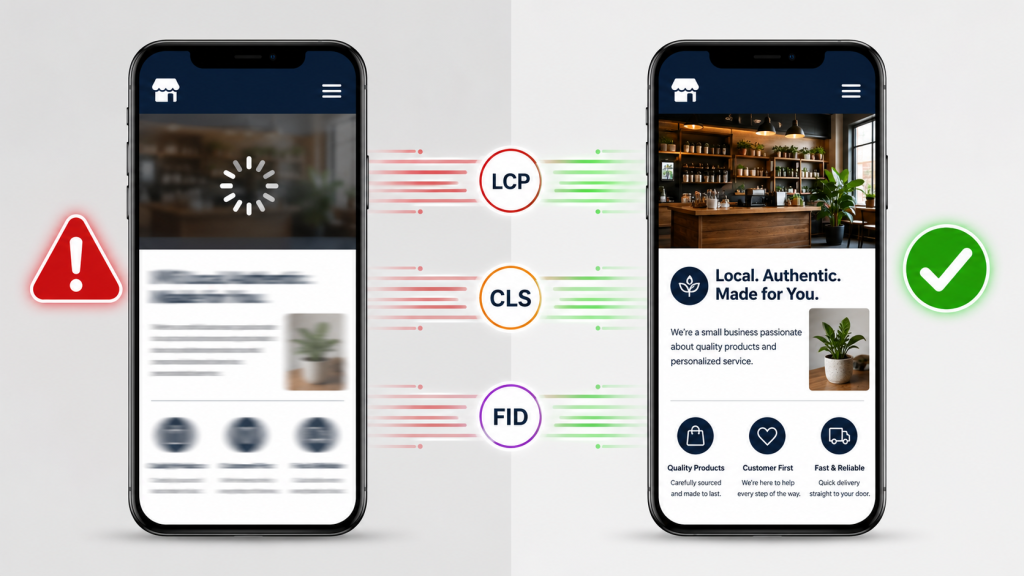
Core Web Vitals is a set of metrics that measure real-world user experience for loading performance, interactivity, and visual stability of the page. According to Google’s official documentation, the three metrics are: Largest Contentful Paint (LCP), which measures loading performance strive to have LCP occur within the first 2.5 seconds; Interaction to Next Paint (INP), which measures responsiveness strive for an INP of less than 200 milliseconds; and Cumulative Layout Shift (CLS), which measures visual stability strive for a CLS score of less than 0.1.
Google’s recent updates, including stricter benchmarks and replacing First Input Delay (FID) with Interaction to Next Paint (INP), demand ongoing optimization to stay competitive.
These aren’t just performance goals. Sites with poor Core Web Vitals experienced 20–30% more severe traffic losses during the December 2025 update compared to faster competitors with equivalent content quality. Core Web Vitals now function as a quality threshold; poor performance can prevent otherwise excellent content from ranking competitively.
How to Fix Your Largest Contentful Paint (LCP)
The largest contentful paint fix is often the highest-impact page speed optimization you can make. As part of Core Web Vitals, the LCP score measures the perceived loading speed of a website. This user-centric metric measures the elapsed time to display the largest content of a web page on the screen visible to a viewer before scrolling.
The most common LCP culprit on small business sites is an unoptimised hero image. LCP can be improved quickly. The largest item visible on the initial screen load is usually a hero image or another image. Optimizing this image will directly improve LCP that means sizing and compressing it so that the file size is around or below 400kb.
Beyond image compression, there are several proven page speed optimization tips to consider. Images should not only be compressed but also converted to modern formats, such as WebP or AVIF. Additionally, if you use WordPress, you can use a caching plugin like WP Rocket so that public-facing pages don’t need to be regenerated for every visitor the server can quickly respond with cached content.
Finally, watch your server response time. You can check if server response time is an issue by looking at the Time to First Byte (TTFB) metric. The TTFB should be below 800 milliseconds.
Quick LCP Wins for Small Business Sites
Consider these targeted page speed optimization tips as a starting checklist. Start by identifying the slowest-loading elements on the site, such as large images or render-blocking scripts, and work on optimising them for faster load times. Compressing images, enabling lazy loading, and reducing third-party JavaScript are some of the most impactful changes you can make.
A combination of lazy loading, browser caching, and media optimisation forms the foundation of high-performing websites that consistently score well on Core Web Vitals.
How to Fix Cumulative Layout Shift (CLS)
Cumulative layout shift is the metric that frustrates users the most even if they can’t name it. Cumulative Layout Shift (CLS) is a critical Core Web Vital metric that evaluates how much a webpage’s visual layout shifts during loading. Unexpected movements, such as a button moving just as a user tries to click it or text shifting as an image loads, can be both frustrating and detrimental to user experience.
The data on how widespread this problem is may surprise you. According to the 2025 Web Almanac, 62% of mobile pages have at least one image without explicit dimensions, a major CLS contributor. Additionally, only 11% of pages preload web fonts, meaning the vast majority of sites are vulnerable to font-swap layout shifts.
The fix is often simpler than you think. Define sizes for visual elements and dynamic content containers. This approach helps to avoid unexpected layout shifts when elements are loaded. For images, videos, iframes, ads, and embeds, setting explicit width and height attributes allows the browser to allocate the correct amount of space while the content is loading.
You should also be careful with dynamic content. Avoid inserting dynamic content above existing content. This single rule eliminates a large number of layout shift issues on small business sites, especially those running pop-ups, banners, or cookie notices near the top of the page.
How to Improve INP (Interaction to Next Paint)
INP replaced FID as the interactivity metric in 2024 and is now a core Google ranking signal in 2025. INP is a real-user web performance metric that measures the responsiveness of a web page. It evaluates the time it takes for the browser to respond to user interactions, such as clicks or taps after the page has finished loading.
The most common cause of a poor INP score on small business websites is bloated JavaScript. Unlike FID, which only measures the delay for the first input, INP considers the responsiveness of the entire page throughout the user’s session. A common reason for a bad INP score is unoptimised JavaScript and CSS files.
The practical solution involves trimming what loads on your pages. Defer non-critical scripts, remove unused plugins, and avoid loading heavy third-party tools (like chatbots or tracking pixels) synchronously. Even small reductions in JavaScript execution time can push your INP below the 200ms threshold.
Tools to Audit Your Core Web Vitals for Free
You don’t need an expensive agency to start. Google PageSpeed Insights gives detailed data from both real users and laboratory metrics. Here you can see LCP, INP, and CLS metrics for a specific page, as well as optimisation recommendations, if needed.
Beyond that tool, Lighthouse allows you to run tests locally or via CI/CD, simulating mobile networks and devices. It checks loading speed, layout stability, and interactivity before users see the site. Google Search Console also surfaces Core Web Vitals issues directly in its dedicated report, a great place to monitor progress over time.
Mobile performance deserves special attention. 53% of mobile users abandon pages that take over 3 seconds to load. Therefore, always run your audits on mobile settings, not just desktop.
FAQ: Core Web Vitals for Small Business
Q: Do Core Web Vitals really affect my small business ranking?
Yes, but they work as a tiebreaker more than a primary factor. Industry testing suggests core web vitals act more as a tiebreaker between similarly relevant pages rather than a primary ranking factor. When multiple pages offer similar content quality and authority, the one with better user experience metrics gains an edge.
Q: How often should I check my Core Web Vitals scores?
Google’s AI algorithms measure real user metrics at unprecedented scale and update rankings rapidly based on actual performance data. This real-time measurement approach means performance degradation can immediately impact search visibility, requiring continuous monitoring and optimisation rather than periodic audits. Monthly checks are a practical minimum for small businesses.
Q: My site passes desktop tests but fails on mobile. Does that matter?
Absolutely. Mobile-first indexing means that Google primarily uses the mobile version of your site for indexing and ranking. In 2025, this shift has become non-negotiable. With mobile traffic now accounting for the majority of internet usage, businesses can no longer afford to treat mobile optimisation as secondary.
Small Fixes, Big Ranking Gains
Core web vitals for small businesses are not a one-time project; they’re an ongoing competitive advantage. If your content quality matches competitors but their user experience is poor, your faster and smoother website may be the deciding factor in the rankings. Start with your hero image, fix your layout shifts, reduce your JavaScript bloat, and audit monthly. These page speed optimization tips cost little but compound significantly over time.
More than 50% of websites still aren’t passing Core Web Vitals as of 2024 which means there’s a real opportunity to get an edge over half of the web by excelling in these metrics. That gap represents low-hanging fruit for any small business willing to act.
Ready to get started? Run your site through Google PageSpeed Insights today, identify your single worst metric, and fix it this week. Schedule a consultation if you’d like a tailored Core Web Vitals audit for your small business site.